Founder's Guide to Building a Second Brain
February 13, 2023
Founders spend their days putting out fires. Context switching is constant and it's important to step back and make sure the tasks you're doing continue to line up with your long-term strategy.
The best way I know of working through these challenges is to be in a clear headspace. Clear headspace facilitates focus and enables you to do your best work.
When you are worried about forgetting a task, insight, or other important piece of information you aren't able to fully dedicate your brain's resources to a task.
The solution as [Tiago Forte's book](https://www.amazon.com/Building-Second-Brain-Organize-Potential/dp/1982167386) lays out is to build a "second brain" when you log projects that need to be done, areas you're responsible for, resources you can quickly reference, and an archive to look back on.
This takes a bit of effort but once you're set up you will be able to focus on tasks for longer and with greater cognitive levels. If this guide is helpful you should read Tiago's book for more depth.
### Building a Second Brain in three easy steps:
# Set up the system
## Decide what you want to capture / focus on
- Improve communication across your business.
- Make the content you read more actionable
- Avoid repeating work.
- Reduce the amount of time you spend searching for things.
## Identify your inboxes
Where do things already accumulate? For me they are
- Computer desktop
- Downloads folder
- Apple notes (since I use Notion for second brain)
- Camera roll / photo library
## Choose a notes app
Just make a choice. I use Notion.
- Computer scientists / power users might like Obsidian
- You can also just use Apple Notes (I use Apple notes for quick input)
- Some people also like OneNote or Evernote — just pick one to use
## Select Capture Tools
Use a read later app like Matter
- People also like Pocket and Instapaper but Matter is free and syncs really easily
Download your note app's web clipper if it has one
## Make PARA Hierarchy Everywhere
### Projects
Short term things that have a definite end date.
Don't be afraid of having "too many"
### Areas of Focus / Accountability
Ongoing things you are responsible for for a long term. They might not have a clear end date.
### Resources
Things that might be useful in the future. No specific actions are required.
### Archive
Inactive things from other areas that move here when completed / abandoned.
Don't worry about sorting things too much since you have a search bar.
And don't build hierarchies below these unless you really need them. Flatter is better to quickly see everything there is.
## **Do this in your**
- Computer File System
- Google Drive, Dropbox,, etc
- Notes App
- Email
## Start using the note system
Make a folder for each active project. You should feel fine about having 20+ projects. Even 50+ isn't a big deal.
Make sure you have these projects:
- Someday / Maybe (things you want to or might do at some point)
- 12 big problems you're thinking about (personal, professional, academic - whatever strikes your interest)
### Start by getting inspired by writing down 12 big problems you're thinking about
You can just drag everything that already exists into archive (remember you can find it later by searching)
## Choose a task app
I use Things3
People also like Todoist, Wunderlist or TickTick — the important thing is just to pick one
### Make these projects
Projects in your notes app
Waiting for (with the date you first asked about the thing you're waiting for)
Delegated (if you're a manager who oversees a lot of important projects)
## Schedule your first weekly review
The weekly review is essential for getting current on everything going on in your life and feeling like you are on top of what's going on.
Copy my checklist below and adapt it for your system
I do Sunday ~8pm
Others do Thursday afternoon or sometime Friday so they can have a clear head going into the weekend
**Purpose: get clear, get current, get creative**
# Collect interesting things
## Keep track of interesting problems you want to keep thinking about
Feynman did this and people were always amazed at how he connected random things in his life to big problems. It was because he kept them top of mind.
## Use a read later app to take control of your content diet
I like matter
they take away the urgency of needing to read something immediately or never at all
- you end up reading less because you realize things aren't important in the context of your entire read later app
you can batch all your random internet reading into a more deliberate time you pick
it's really easy to highlight things and save them
no ads
### Web clippers can do the same thing for websites
### YouTube has a watch later feature too!
I want to put a rule where I can't watch any videos I see for 24 hours
I am looking for a tool where I can highlight YouTube video transcripts right into Notion
### Email excerpts are an unsolved problem
Some may say that using something like this is just an excuse to not build discipline. I am somewhat sympathetic to this argument but you require an order of magnitude more discipline than previous generations because teams of PhDs sit around all day engineering their products to be addictive. You need tools to fight this.
## Types of things to collect
Highlights of passages
Quotes
Bookmarks to favorite websites
Voice memos
Meeting notes / agendas
Photos
Takeaways / lessons learned form things
Favorite stories (yours or even other people's)
Memories
Reflection
Insights / realizations
Musings / random thoughts
Anything that inspires you
## Type of things not to collect
Information that would be useful to a hacker like ID docs, finances, passwords, sensitive health records etc
Special file formats that are hard to open in your notes app
Very large apps that will make the app lag
Things to work collaboratively on (though Notion is probably okay)
## Review important notes twice (or even three times)
First bold everything that's important
Second read all the bold things and highlight what's most important
Write an executive summary at the top if a you review the note a lot or many people will review the note
This is an important part of starting the creative process and preparing for meetings.
# Sort all of the interesting things once a week
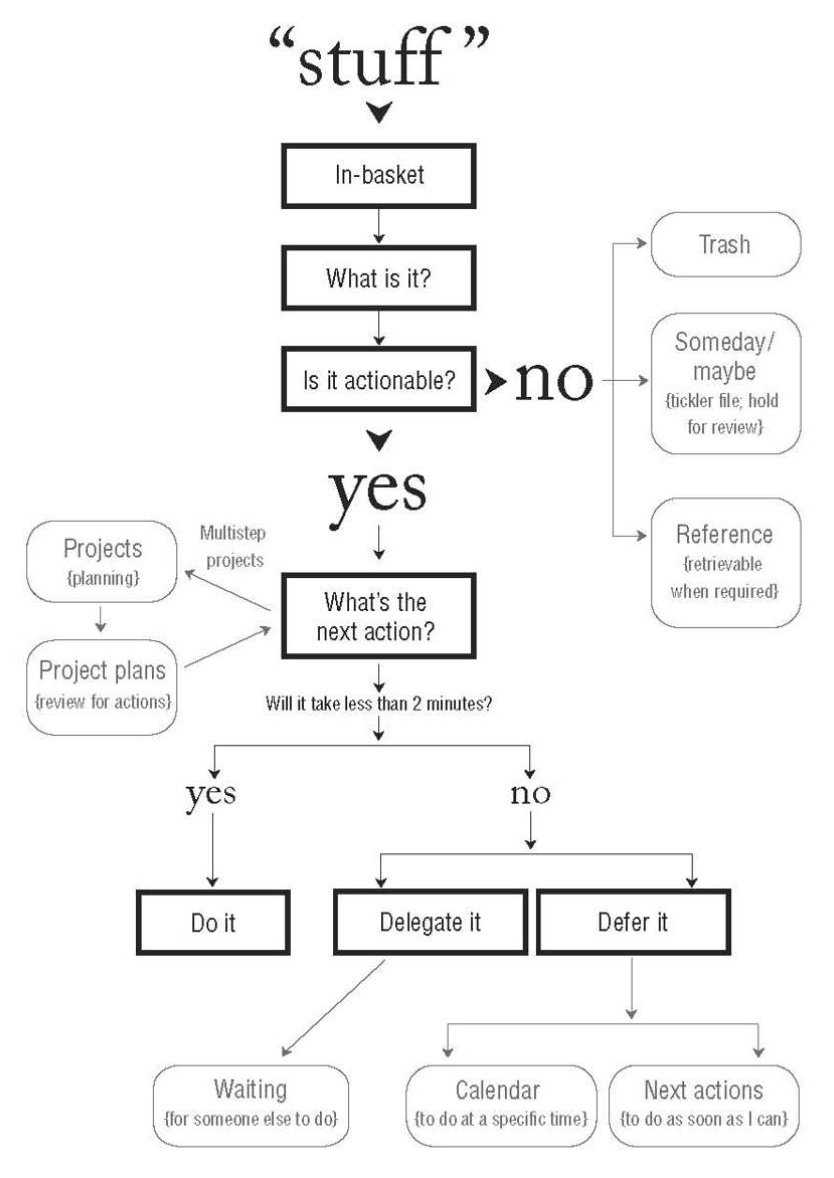
Here's a flow chart from the book:
{: .img-portrait}